The graphic is an attempt to represent the flow of execution through the logwitch.lua script. Except for the pictorial item 1a, all items are named functions within the script.
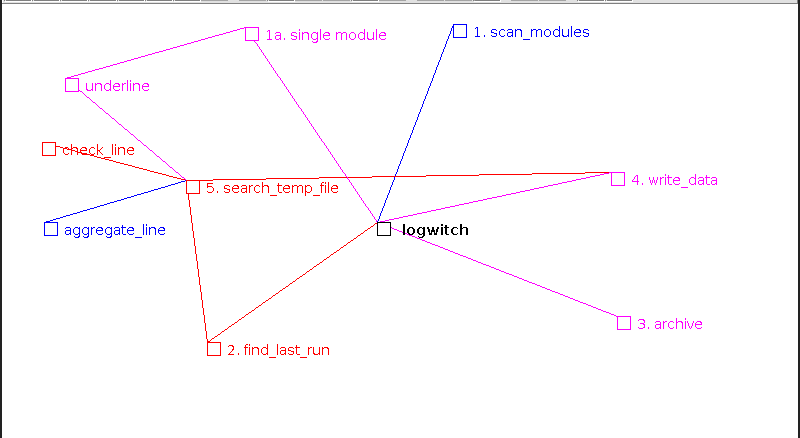
The first function call to scan_modules simply creates an array of modules from the .lua files in the same directory. This only happens when logwitch is called without the -mod or -grep options, when only a single module's logs will be examined. Each (or a single) module is then processed as follows.
In the find_last_run function the first file in module.log array is written to a string, headed up by the actual filename. We're taking advantage of lua's ability to efficiently handle lengthy strings with such a design. If logwitch was called with the -cron option, a tag is added at the file's end. The string is then searched to find a similar ***logwitch was here tag. If no such tag is found, the process of adding other log file's content continues until the tag is found or until the entire content of all files has been added. If any files that need to be examined have been gzipped, the archive function is called to first gunzip and then gzip them. If the -grep option was used the content of all files is added to the string; the added tags are ignored as no effort is made to include only activity recorded since the last -cron run.
The write_data function is then called; it writes the string to a temporary file, headed up by the module's name.
The search_temp_file function is next called to decide what is to be done with each line in this file. The line may be dropped, depending on the content of the module.alert array, included in another temproary string, or recorded modified in accordence with the module.present function. The check_line contains the main decision logic and may be aided by the underline and aggregate functions.
The finalized report, held in the temporary string will now be presented on screen, or if logwitch was called with the -cron option the write_data function will be called again to produce a report file that can be emailed or copied as required.